Make a donation for Giving Tuesday and have your gift doubled! Give now



New Student Checklist
New Student Checklist
All new students complete a series of tasks before starting classes at GC. The New Student Checklist groups these items into two categories:
- Tasks required for course registration: New students must complete the following before the Registrar’s Office will register them. This includes Forms to Complete.
- Tasks required before you begin classes: New students must complete the following list of forms and tasks before the first day of classes.
Students can find more information on each checklist item by logging in to MyGC and selecting “New Student Checklist” under the Deposited Students heading.
- Complete the Advising Questionnaire
- Request to have your official final high school transcript sent to GC
- Request to have your official college transcript(s) sent to GC
- Request to have your AP/IB scores sent to GC
- Complete the online ALEKS Math Placement Test
- Complete the Online Foreign Language Placement Test (optional)
- Accept or decline your financial aid
- Submit the Financial Responsibility Agreement
- Submit the Student Life Residence Form
- Submit the Student Health Information Form and upload immunization records
- Set up Parent Access
- Review your estimated bill
- Pay the semester balance or set up a payment plan
- Complete the Master Promissory Note and Entrance Counseling for federal loans
- Submit the Laptop Selection Form (first-years only)
- Submit the Laptop Usage Agreement Form (first-years only)
- Purchase your textbooks and course materials
- Complete the Emergency Contact Form
- Submit a photo for your GC ID card
- Request accommodations
- Register your vehicle
- Download Yapp (orientation app)
Accessing the items listed on the New Student Checklist
Follow the steps below to access the forms you must complete to ensure a smooth transition into Goshen College.
Note: You will gain access to the forms in MyGC 2-3 business days after submitting your enrollment deposit.
- Go to MyGC
- Select the login button in the top right corner.
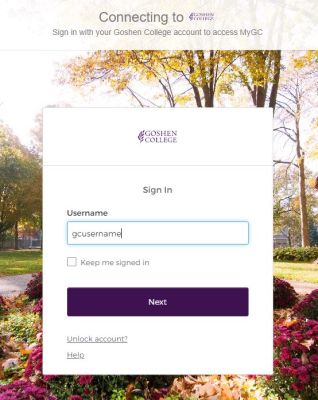
- Login into GC’s single-sign-on page using your GC username and password.
- Your GC username was sent to the email address you indicated on your application.
- Incoming students who have deposited with Goshen College are required to use multi-factor authentication (MFA) when signing into their Goshen College account. Information was sent to your personal and Goshen College email accounts.
- Contact your admissions counselor for assistance if you have trouble finding the emails with your GC username of have trouble with your password.
- Look for Deposited Students under the NEXT STEPS heading and select ‘Forms to Complete’
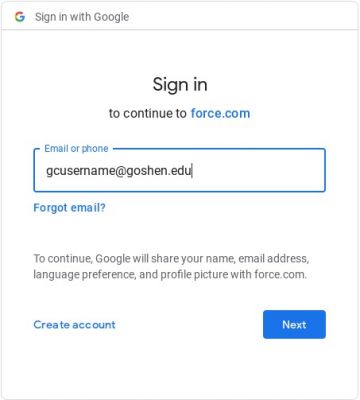
- Enter your GC email address (gcusername@goshen.edu) and click “Next.”
- You will arrive at the list of forms that you need to complete. To complete these forms, click on “Start” next to the form’s name and follow the instructions for each form.

If you have difficulties accessing or completing the forms, contact your admissions counselor (or admissions@goshen.edu) for assistance!