Designing web pages for accessibility
In the news:
- The Sydney Olympics
were forced in court to make their website handicapped accessible.
- The U.S.
Federal government was required, among other things, to make all
federal websites handicapped accessible as of June 21, 2001.
"In order to meet the standards, websites need to write text
descriptions of pictures and multimedia files into their html
code; need to be easily navigable using text commands, mouse,
or keyboard alone; and should avoid frames and pop-up
windows that screen readers can't translate, among other things.
"
The W3C has put out suggested guidelines for how to create "accessible"
pages. The focus is on access for the handicapped. But, following their
guidelines is likely to make your pages easier to use, for non-handicapped
users as well.
One of the intellectually most challenging things about designing for
the web is mentally keeping track of how your design might change
depending on if someone looks at your pages with (items marked with an asterisk
will be checked in the Final Project):
- a different brand of browser,*
- at a different browser window width,*
- at a different screen resolution,
- with a different choice of default fonts,
- with an 8-bit, or a 24-bit color monitor,
- and many more variations....
In the lingo of the W3C, a "user agent" is a generic
term applied to any device or software that gives people access to the
web. Now, in addtion to the above, you should also keep in mind several
different kinds of user agents, a.k.a. "browsers", that might:
- render web content as Braille,
- using voice synthesis, read a web page through a speaker. Such
a user agent might also be used by non-handicapped people to access
the web in their car, while they're driving.
- blow up the font size very large, for those with limited vision.
- handle only text.
Additionally, there are also ways of specifying the language (English,
Spanish, etc.) in use on a particular page. And this specification would
be used by, e.g. a voice-synthesizer, to pick appropriate pronunciation.
The examples below relate to the numbered guidelines in the W3C accessibility
specification. We'll discuss highlights of the 14 of the W3C's guidelines
(particularly those labelled Priority 1), with selected examples and resources
following here...
1- Alternatives to auditory and visual content*
W3C
guideline 1
It's a good idea to use the ALT attribute
for well nigh every image you use (well, perhaps excepting pixel shims).
But it's unexcusable not to use ALT for any
image used in navigating your site.
The example below shows an image map, with 'alt' content set for the
various options within the image, as well as text alternatives below
the image.
One needs to worry about providing alternative text content not only
with image maps, but also with html generated from "slices".
Here, it's easier to do: just use the regular way of attaching ALT text
to images.
3 - Separating logical formatting and presentation formatting*
W3C
guidelene 3
Don't use markup tags that indicate the logical structure of a document
for purely visual effects. Blind folks will "browse" by scanning an outline
constructed from the headlines on the page. This will frustrate that scanning
strategy...
 "Wow"! "Wow"!
I said to my dad, when I saw the new Corvette parked in the driveway...
<H1> (spacer image) "Wow"!</H1>
<P>I said to my dad, when I saw the new Corvette parked
in the driveway...</P> |
Rather, do this...
| "Wow!",
I said to my dad, when I saw the new Corvette...
<P><SPAN STYLE="font-size:2em">"Wow!",</SPAN></P>
<P>I said to my dad, when I saw the new Corvette...</P> |
4 - Clarifying what (human) language you're using
W3C
guideline 4
Proper indication of language will help UAs pronounce words correctly
| <html lang="es">
<body>
<title>CEPAD les ofrece la bienvenida a todos los visitantes....</title>
|
5 - Tables
W3C
guideline 5
The guidelines refer to linearized tables...This refers to displaying
or reading off the contents of a table in the order in which the content
appears in the HTML source code. The table below would not survive linearization
too well:
| Goshen College |
|
Science Department |
| 1700 S Main St |
|
Marilyn Bayak, marilynb@goshen.edu |
| Goshen, IN 46526 |
|
(574) 535-7519 |
| (574) 535-7000 |
|
|
whereas this one would...
Goshen College
1700 S Main St
Goshen, IN 46526
(574) 535-7000
|
|
Science Department
Doris Yoder, dorisoy@goshen.edu
(574) 535-7519
|
6 - Graceful degradation with new technologies
W3C
guideline 6
Using the Web Developer Toolbar you can go to CSS | Disable Styles | All Styles to try your document without styles. Try this on the Hoosier Riverwatch page and a story at Newsweek.com.
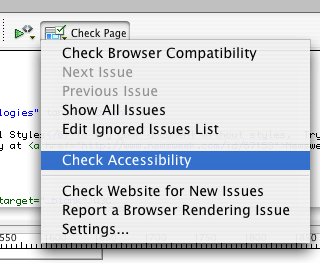 Dreamweaver
includes a report on accessibility (at right).
Dreamweaver
includes a report on accessibility (at right).
Another useful way of checking a page is through WAVE (see below).
7 - Content that changes with time
W3C
guideline 7
"People with photosensitive epilepsy can have seizures triggered by
flickering or flashing in the 4 to 59 flashes per second (Hertz) range
with a peak sensitivity at 20 flashes per second"
10 - Interim solutions
W3C
guideline 10
This guideline points out that current handicapped UAs have problems
following links that pop up extra windows (whether by means of javascript
or using frame targets
like this with the "_blank" target attribute).
13 - Facilitating navigation*
W3C
guideline 13
Newer browsers, and handicapped UAs recognize the a title attribute in link anchor tags and many other tags. You can use it to give
extra context or detail. Think of it as the alt
attribute for non-image tags. The title attribute can be added (harmlessly
for older browsers) to just about any tag--including <TABLE>, and
<FRAME>.
This HTML... <A HREF="http://www.goshen.edu"
TITLE="A four-year liberal arts college in the Mennonite tradition">Goshen
College</A> (see below) displays a tool tip with the
contents of the title attribute when the mouse is overtop the link in
most browsers since IE 5 and NS 6.
Goshen
College
Of course, don't forget the even lower-tech choice of the text for your
link anchors--almost anything is better than "click here"!
14 - Writing to be understood
W3C
guideline
14
Some resources related to writing style
Effective use of typography
Skip navigation
The HTML for a typical page might have many, many navigation links and graphics at the top of the markup, before the markup for the "content" (or "main story") on the page.
It's easy for those of us with sight to glance at a web page and see where the main story starts.
But for folks using a screen reader, moving past lots of navigation links to get to the main content of a page can be very slow. (see Jim Thatcher's discussion of these issues and solutions) Options include:
- Using a Skip Navigation link to jump from the top of the page to an anchor at the beginning of the main content. (This is more complex than it would seem because of a bug with IE 5 and 6).
- Using Headings so the first one is beginning of the main content.
- Writing the source code with the main content near the top, using CSS to position the navigation visually as you'd like.
Here's an example (simplified from Hoosier Riverwatch) of how to set up a 'skip navigation link` at the very top of a page.
<body>
<a href="#belownav" accesskey="1"
  style="position:absolute;
         top: 0px; left: -9999px;">Skip Navigation</a>
...
<p id='belownav'>Here's where the content begins....
- Sighted folks using a regular browser won't see this link, since it's positioned way off the left edge of the page.
- For folks using a screen reader, it's the first thing on the page.
- Since it's the first link on the page it's also the first thing in the "tab order" of elements on the page. Hitting [tab], [return] will skip the reader directly to #belownav
Other considerations for accessibility
W3C Guidelines are being updated
The new version will be Web
Content Accessibility Guidelines (WCAG) 2.0 expected to be completed
in 2008
This draft of the Quick Reference Document explains the system of Baselines and Success Criteria Levels
Tools to assess accessibility
Wave - http://wave.webaim.org/
-- Sort of like a 'validator': feed it the
URL of any page and receive a quick and easy-to-digest report of accessibility
problems.
http://www.freedomscientific.com/fs_products/software_jaws70fea.asp#download/
-- source for JAWS a HTML reader.
See also: good/bad accessibility examples (U Wisc), AFB Tips and Tricks
Site comparison
How do these sites stack up?