 Many times you can think of the HTML markup for a typical page on your site as a sandwich:
CSS lets you separate content and design
Wouldn't it be nice if we could separate content and navigation? We can by using the php 'include' statement.
 Chapter 25
php - the php hypertext pre-processor
PHP is a widely-used general-purpose scripting language that is especially suited for Web development and can be embedded into HTML.
--php.net
Pages written in php contain html markup, just like regular web pages, except that, before delivering the php page requested to the browser, the webserver will execute any php programming language statements which show up within the special <?...?> tag. (no closing tag). For example:
<span style="color:green">
<?
  print "Today is ". date("l");
?>
</span>
Resulting in
So, php let's you dynamically generate HTML markup in your web pages.
We'll take advantage of a php command that let's you pull the contents of a file into the "source code" of your web page. Here's how you use the php include command to have the HTML markup in a file called "menu.h" inserted at a particular point in the source code of your web page...
<? include "menu.h"; ?>
If 'menu.h' includes nothing but this....
<p>
  <a href="index.html">HOME</a> |
  <a href="about.html">About us</a> | ....
</p>
Then, we'll get a simple navigation menu showing up that looks like...
HOME | About us | ....
The magic happens when many pages in our site all use this means to pull in the same chunk of HTML that creates these links. Now...
The markup for the orange menu bar used in many GC pages is located at...
http://www.goshen.edu/a_navbar.htm
Try include-ing this URL in a page of your own!
As far as the chunk of html that you include is concerned:
Many times you can think of the HTML markup for a typical page on your site as a sandwich:
When this is the case, we often talk about the first slice of markup as the "head" or "header", and the bottom slice as the "foot" or "footer".
The markup for a 'Sea Lion' page, except for the area where the content goes, has been concentrated into two chunks, and you can get such a page to appear on any php page that looks like this...
<!DOCTYPE HTML PUBLIC "-//W3C//DTD HTML 4.0 Strict//EN">
<html>
<head>
<title>SSI: Server-Side Includes with php</title>
</head>
<link rel="stylesheet" type="text/css"
 href="http://www.goshen.edu/communication/326/layout/peru/style.css" />
<body>
<? include "http://www.goshen.edu/communication/326/layout/peru/head.h"; ?>

<p>Your unique content goes here</p>

<? include "http://www.goshen.edu/communication/326/layout/peru/footer.h"; ?>
</body>
</html>
Try it by pasting this into a file, and saving as "[anything].php".
The GC Blog system sandwiches your blog entries between two slices of markup which you can change
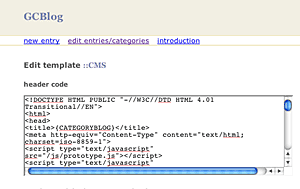
Example: The GCMusic center gcmusiccenter.org uses the GCBlog system to drive its announcements section. Why?
To come up with the header and footer markup, you would...
<?
$i = rand(1,5);
$thefile = "myphoto$i.jpg";
print "<p align='center'><b>$thefile</b></p>";
?>