Javascript - introduction
Where is that new world? [javascript image swap example]

East?
or
West?
Code for the above:
<img src="qmark.jpg" width="100" height="157"
id="whither" />
<p align=center>
<a href=""
onmouseover="document.getElementById('whither').src='colonr.jpg'"
>East?</a>
or
<a href=""
onmouseout="document.getElementById('whither').src='colonl.jpg'"
>West?</a>
</p>
|
In the example above,
- Moving the mouse over top the 'East' link triggers (starts)
a javascript script.
- In this case, the script consists of just one javascript command,
document.whither.src='colonr.jpg'.
- The effect of this command is to change or set the source
of the image named with the id of 'whither' from whatever it was to 'colonr.jpg'.
It's as if one had changed the contents of the src
attribute in the <img src='____' ...>
tag.
Rollovers
Combining two actions and two images:
- onMouseOver swap in this image:

- onMouseOut swap the original image back in:
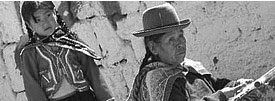
...and you get a rollover image:
<a href=".."
  onmouseout="document.getElementById('peru').src='perubw.jpg'">
  onmouseover="document.getElementById('peru').src='perucolor.jpg'">
<img src="perubw.jpg" id="peru" />
</a>
Javascript
- ...is a scripting language that can change your web page in response to user actions.
- depends on the browser. The 'interpreter' software to recognize and execute javascript is built in to the browser. (In php, it's built into the web*server*):
- Some folks (about 5%) browse the web with javascript turned off.
- Search engines, and other robots interact with website as 'browsers'. But it's usually too much work for their authors to build a javascript interpreter as well as the robot itself, so typically, robots cannot "see" javascript effects.
- There are many repositories of useful javascript scripts around the Internet (e.g. javascript.com).