Support GC students today by making your gift to the GC Fund before our fiscal year ends on June 30! goshen.edu/give


New Student Checklist
A comprehensive list of what to do after you deposit
All new students complete a series of tasks before starting classes at GC. The New Student Checklist groups these items into two categories: tasks required for course registration, and tasks you need to complete before you begin classes. This list includes items you’ll see in your list of Forms to Complete.
Students can find more information on each checklist item by logging in to MyGC and selecting “New Student Checklist” under the Deposited Students heading.
Tasks required for course registration
New students must complete the following before the Registrar’s Office will register them for classes. Contact information for the office or department to contact with questions is listed with each item.
THE REGISTRAR’S OFFICE WILL BEGIN CREATING NEW STUDENT SCHEDULES THE WEEK OF JUNE 22. PRIORITY WILL BE GIVEN TO STUDENTS WHO HAVE COMPLETED THESE ITEMS BY MONDAY, JUNE 15.
All new students complete the Advising Questionnaire, which provides information to help our advisors create a schedule suited to each student’s interests and background.
Before you complete the Advising Questionnaire, we encourage you to read the New Student Registration packet, which provides information on the Core (general education) requirements.
Click here to view the New Student Registration packet.
FIRST-YEARS
Your questionnaire will prompt you to confirm your intended field of study, co-curricular involvement, select your top choice for each section of the Core, share about your high school experience, indicate whether you expect to receive dual credit from high school, and identify any anticipated academic support needs.TRANSFERS
Your questionnaire will prompt you to confirm your intended field of study, your co-curricular involvement, your anticipated graduation date, and identify any anticipated academic support needs at GC.The Registrar’s Office will begin creating schedules the week of June 22. The Advising Questionnaire must be submitted by Monday, June 15, to be included in the first round of scheduling.
CONTACT INFORMATION
Department: Registrar’s Office
Phone: 574-535-7513
Email: [email protected]
Website: https://www.goshen.edu/registrars-office/Final high school transcripts are required for all new first-year students to Goshen College. Your final high school transcript will list an official graduation date and is used to confirm that you graduated, having met high school requirements. Transcripts must be sent directly from your high school.
FIRST-YEARS
We must receive an official copy of your final high school transcript to complete your admission to Goshen College.Please get in touch with your high school guidance office and request that your final high school transcript be sent to the Goshen College Admissions Office, 1700 S. Main St., Goshen, IN 46526, or electronically to [email protected].
TRANSFERS
Transfer students bringing 16 or fewer college credits may be asked to provide an official final high school transcript to complete their admission to Goshen College.CONTACT INFORMATION
Department: Registrar’s Office
Phone: 574-535-7513
Email: [email protected]
Website: https://www.goshen.edu/registrars-office/Final college transcripts are required for all new students to Goshen College. A final transcript confirms that you have met the requirements to receive college credit for courses completed at a different college or university. Transcripts must be sent directly by the institution.
- Please request, from the college that issued the credit, that your final transcript be sent to the Goshen College Admissions Office, 1700 S. Main St., Goshen, IN 46526, or electronically to [email protected].
- If you have credits from multiple colleges, you must request transcripts from each college to be sent to GC so that your credits can be transferred.
FIRST-YEARS
Final dual credit college transcript(s): If you completed a dual credit course, you must request that the college (not your high school) send your college transcript(s) to Goshen College. We must receive an official copy of your final transcript to complete your admission to Goshen College.TRANSFERS
Final college transcript: To complete your admission to Goshen College, we must receive an official copy of your final transcript from all the colleges you attended.CONTACT INFORMATION
Department: Registrar’s Office
Phone: 574-535-7513
Email: [email protected]
Website: https://www.goshen.edu/registrars-office/Goshen College acknowledges some credits awarded through Advanced Placement exams, International Baccalaureate courses, and other credit-awarding courses you may have completed.
ADVANCED PLACEMENT (AP)
Goshen College acknowledges Advanced Placement exam results. Credit is awarded for scores of three or higher, documented on an official AP exam score report. Credits may be counted toward GC CORE requirements, major or minor requirements, or electives.Click here to view the AP score equivalencies table
For other exams not listed, we would award 3 hours of elective credit for scores of 3 or better. NOTE: If a student has both Lit & Comp and Lang & Comp AP test scores, 6 hrs will be awarded only if both scores are 4 or 5.
Click here to request that your AP scores be sent to Goshen College
Request your scores to be sent to Goshen College. You can order online, by mail, or by fax. No credit for AP scores will be posted without an official score report. Goshen College will accept E-transcripts and score reports sent to [email protected] or paper copies sent to: Registrar’s Office, Goshen College, 1700 S. Main St., Goshen, IN 46526
INTERNATIONAL BACCALAUREATE (IB)
Goshen College recognizes International Baccalaureate courses and grants credit for scores of five or higher in both the Higher Level and Standard Level courses. Scores of four on select courses may be referred to department chairs for consideration of credit equivalency. IB credits may be counted toward GC CORE requirements, major or minor requirements, or electives. A maximum of 30 credit hours is granted.Click here to view the Goshen College IB score equivalencies chart (PDF)
Click here to request that your IB results be sent to Goshen College
Have your IB results sent to Goshen College. No credit for IB courses will be posted without an official IB report. Goshen College will accept E-transcripts and score reports sent to [email protected] or paper copies sent to: Registrar’s Office, Goshen College, 1700 S. Main St., Goshen, IN 46526
CONTACT INFORMATION
Department: Registrar’s Office
Phone: 574-535-7513
Email: [email protected]
Website: https://www.goshen.edu/registrars-office/Most new students should complete the online ALEKS mathematics placement test. The test will help determine the best course that you should take to meet the Quantitative Literacy requirement and your major’s requirements.
Is the placement test required?
You do NOT need to take the exam IF your intended major has no mathematics or statistics course requirements, AND you meet the Quantitative Literacy requirement with at least 3 credit hours of college-level mathematics.
- An AP math exam (3 or higher)
- An IB math exam (4 or higher), or
- A grade of a B- or higher in a dual credit math course
- All new students who meet the Quantitative Literacy requirement but need to enroll in math courses to fulfill their major requirements will complete ALEKS.
For example, you could have earned a score of 3 or higher on an AP math exam, scored 4 or higher on an IB math exam, or earned a grade of B- or higher in a dual credit math course. Even in this circumstance, it could be helpful to take the exam. Students often change their major or do not realize that their major includes a course for which a mathematics course would be useful preparation.
ALEKS score and quantitative literacy course recommendations
- See course recommendations based on your score
- Find out how to access the prep and learning modules
CONTACT INFORMATION
Department: Math Department
Email: [email protected]Placement testing is available for students who wish to determine their language-level readiness for enrollment. Testing is offered in Spanish, French, German, and Chinese.
Some students’ placement scores will also fulfill their foreign language requirement (no credits are earned for the placement test). The Academic Success Center (ASC) facilitates placement testing using Emmersion, an online platform.
FAQ
Who should take a language placement test?
Language placement tests are encouraged for all students who:
- Enrolled in language classes (French or Spanish) in high school and wish to pursue that same language at GC. Taking the language placement test ensures placement into the course that best matches your level of expertise.
- Grew up in the United States, speak both English and one of our offered languages (French or Spanish) at home, and wish to pursue that same language at GC. Taking the language placement test ensures placement into the course that best matches your level of expertise.
- Successfully completed three or more years of Spanish, French, German, or Chinese language study in high school and wish to establish international language proficiency for studying abroad and meet the two-semester foreign language requirement for graduation.
You do not need to take a language placement test if:
- You have never studied the specific language you wish to pursue at GC.
- You have college transfer credit in a foreign language.
- Your home language (dominant language) is not one of the testing languages, and you plan to seek a waiver for the language requirement.
CONTACT INFORMATION
Department: Academic Success Center
Phone: 574-535-7560
Email: [email protected]
Website: https://www.goshen.edu/academics/registrars-office/placement-tests/All new students must accept or decline their loans and work study through the financial aid portal.
If you have any questions regarding your financial aid, please schedule a brief appointment with one of our representatives. Don’t hesitate to contact our office using the contact information provided below.
CONTACT INFORMATION
Department: Student Financial Services
Phone: (574) 535-7525
Email: [email protected]
Website: https://www.goshen.edu/financial-aid/undergraduate/The Financial Responsibility Agreement is a required document for all students.
Signing the form confirms your payment options (i.e., how you plan on paying what you owe to the college) and that you’ve read the critical billing information, including what happens if you don’t pay your bill on time.
- Page 1: If you do not have an employer or program covering your costs, please consider the first three payment options (out-of-pocket, financial aid, and a payment plan, if needed). You are also agreeing to check your GC email and respond promptly.
- Page 2: Asks for permission to text you, if needed. That does not happen frequently. It also asks for permission to send your 1098-T tax document electronically, instead of mailing a hard copy in January. We encourage you to agree to both.
- Page 3: The fine print. It’s our “terms and conditions” page, based on current best practices.
CONTACT INFORMATION
Department: Student Financial Services
Phone: 574-535-7513
Email: [email protected]
Website: https://www.goshen.edu/financial-aid/undergraduate/Goshen College requires all incoming first-year students to have access to a laptop that can be used daily in class, in labs, in collaboration spaces, and anywhere else learning activities take place. Besides being a tool that helps you succeed in college, using your laptop throughout your years at GC will build the computer skills and expertise employers require.
You can bring a personal laptop if it meets or exceeds the minimum requirements (see below for more details). If you don’t have the option to provide your own laptop, you may participate in Goshen College’s Laptop Program for a fee of $200 per semester ($400 annually). By participating in this program, you will sign an agreement granting you access to a laptop owned and managed by the college.
New first-year students will complete the Laptop Selection Form to indicate whether they are providing a personal laptop or would like to participate in the Goshen College Laptop Program. Students who opt to receive a laptop will also complete the Laptop Usage Agreement.
CONTACT INFORMATION
Department: Information Technology Services (ITS)
Phone: 574-535-7700
Email: [email protected]
Website: https://www.goshen.edu/its/helpdesk/All new students complete the Student Life Residence Form to express their housing preferences for the upcoming academic year. This includes commuter students who will identify their home as their preferred location. Commuter students can also use this form to opt into a meal plan.
Note: Full-time students must live on campus until four years removed from high school, turn 23 before December 31, or live at home with parents/guardians or spouse and/or dependents within 30 miles of campus.
CONTACT INFORMATION
Department: Residence Life
Phone: 574-535-7288
Email: [email protected]
Website: https://www.goshen.edu/student-life/housing/resident-life/All new students are required to submit the Student Health Information Form along with their immunization records or exemption form.
For student-athletes, please note that this form is separate from the medical forms submitted to Athletics. Please plan to obtain the necessary information for your immunizations or exemption.
Immunizations
Goshen College is committed to ensuring a healthy learning and working environment for its college community. The College policy aligns with Indiana State law in the requirement that all students receive specific immunizations prior to starting on-campus courses or living on campus.Students may submit their immunization records by submitting their electronic Student Health Information Form through MyGC.
Immunization Requirements include:
- Measles/Mumps/Rubella (MMR)
- Tetanus/Diphtheria/Pertussis (TDAP)
- Meningitis
- Tuberculosis – Students who reside outside of the USA, or who are exposed to at-risk populations, are required to complete a Tuberculosis (TB) test within the USA prior to the start of classes.
Exemptions: Students wishing to secure a medical or religious exemption for specific immunizations may submit a completed Goshen College Medical/Religious Exemption Form.
Health Insurance
Goshen College strongly recommends that all students be covered by a personal or family health insurance plan. Health insurance reduces the impact of incurred medical expenses while students pursue their educational goals.Note: Students participating in specific programs or activities (e.g., Athletics, Nursing, SST) may be required to submit their health insurance information and additional medical information to the respective departments. Students should contact the relevant departments to determine the specific requirements and regulations.
CONTACT INFORMATION
Department: Center of Health and Wellness Office
Phone: 574-535-7474
Email: [email protected]
Website: https://www.goshen.edu/health/
Tasks required before you begin classes
New students must complete the following list of forms and tasks before the first day of classes. Contact information for the office or department to contact with questions is listed with each item.
All new students should download Yapp, the orientation app, to access important new student information. The app has helpful features such as important dates, the schedule, and quick access to the campus map.
CONTACT INFORMATION
Department: Orientation
Phone: 574-535-7706
Email: [email protected]
Website: https://www.goshen.edu/new-students/orientation/Students may authorize parents (and other trusted adults) to view their student information and financial information, such as grades, class schedules, financial aid, and tuition bills, in MyGC.
When a student gives parents or others permission to view student information:
- Permits the person(s) listed in Parent Access to have access to your grades, course schedule, and unofficial transcript
- Permits the person(s) listed in Parent Access to have conversations with the Registrar’s Office regarding the items listed above and others involved with a student’s academic progress
When a student gives parents or others permission to view financial information:
- You’ll continue to receive information related to your account balance and other financial information to your Goshen College email address
- You’ll continue to have access to this information via MyGC
- Allows the college to communicate important information about your account to the person(s) you’ve allowed access to
- Permits the person(s) listed in Parent Access to have access to your 1098T, financial aid awards, financial aid missing documents, and your accounting statements information
- Permits the person(s) listed in Parent Access to have conversations with the Student Financial Services Office regarding the items listed above
- It does not release you from the responsibility of turning in the necessary financial documents or payment of your outstanding balance due
Goshen College strongly recommends that students give access to anyone who provides financial support or manages college expenses.
Click here to read more information about Parent Access
CONTACT INFORMATION
Department: Registrar’s Office
Phone: 574-535-7513
Email: [email protected]
Website: https://www.goshen.edu/registrars-office/Preliminary charges are calculated and added to student accounts approximately a month before the semester due date. When estimated bills are ready, Student Financial Services contacts students (via their GC email address) and authorized parents (or another authorized adult) to let them know it is ready.
How to view your bill (what you owe to attend Goshen College)
Your bill identifies the amount you have to pay to attend Goshen College. You are billed for each semester (also known as a term), and your account must be paid in full or have a payment plan to cover the entire cost by the deadline. You must be registered for classes for a bill to be generated. Bills can be viewed by logging in to MyGC.CONTACT INFORMATION
Department: Student Financial Services
Phone: (574) 535-7525
Email: [email protected]
Website: https://www.goshen.edu/financial-aid/undergraduate/All students should plan how to cover their account balance after factoring in financial aid.
How to pay your bill
You have options when paying for your GC education, including enrolling in a monthly payment plan. Goshen College offers an online tuition payment/payment plan system via Nelnet. You can either pay your balance with a single payment or you can set up a payment plan. Advantages to using Nelnet include easy online enrollment, flexible payment options, no interest, and online payments.Setting up a payment plan is strongly recommended if you do not intend to take out loans or pay the balance in a single payment. This option is time-sensitive because the earlier you sign up for a payment plan, the more months you have to pay off the balance and reduce your monthly payment.
Click here to view your payment options
CONTACT INFORMATION
Department: Student Financial Services
Phone: (574) 535-7525
Email: [email protected]
Website: https://www.goshen.edu/financial-aid/undergraduate/Students who accept federal loans are required to complete the Master Promissory Note and Entrance Counseling before the loan is disbursed (applied to your account).
MASTER PROMISSORY NOTE (MPN)
A Master Promissory Note (MPN) is a legal document in which you promise to repay your loan(s) and any accrued interest and fees to the U.S. Department of Education. It also explains the terms and conditions of your loan(s).Who should complete this?
Eligible undergraduate students requesting Direct Subsidized Loans or Direct Unsubsidized Loans.How long will it take?
Most people complete each MPN in less than 30 minutes. The entire MPN process must be completed in a single session.What do I need?
- Verified username and password (FSA ID)
- School Name
- Permanent/Mailing Address
- Contact Information
- Reference Information
MASTER PROMISSORY NOTE via the Federal Student Aid website
ENTRANCE COUNSELING (EC)
Entrance counseling ensures that you understand the terms and conditions of your loan and your rights and responsibilities. You’ll learn what a loan is, how interest works, your options for repayment, and how to avoid delinquency and default. When you’re finished, a record of your completion will be sent to the schools you selected, and you can then receive your loan money. Keep in mind that you cannot save and leave an incomplete session; you must complete entrance counseling in one sitting.Who should complete this?
Students receiving the following types of loans for the first time:- Direct Subsidized Loans
- Direct Unsubsidized Loans
How long will it take?
Entrance Counseling takes about 30 minutes to complete and must be completed in a single session.What do I need?
- Verified StudentAid.gov account
- School Name
- Financial Aid Offer (this is the letter from your school that outlines your loans, scholarships, and other aid it offered)
- Breakdown of Your School’s Tuition and Fees
ENTRANCE COUNSELING via the Federal Student Aid website
CONTACT INFORMATION
Department: Student Financial Services
Phone: (574) 535-7525
Email: [email protected]
Website: https://www.goshen.edu/financial-aid/undergraduate/First-year students who opt in to the Goshen College Laptop Program will also sign the Laptop Usage Agreement. By signing the agreement, you confirm payment and ownership and acknowledge what to do if you withdraw from the college. The agreement will be added to your list of Forms to Complete.
CONTACT INFORMATION
Department: Information Technology Services (ITS)
Phone: 574-535-7700
Email: [email protected]Buying your required books is an important part of being prepared for class. Most classes you take at Goshen College require you to purchase or rent a textbook or course materials. Those should be purchased and ready to use on the first day of classes. We recommend purchasing your own course materials instead of sharing them with a classmate.
You will get emails from Vitalsource, our bookstore vendor, letting you know what is required for each of your classes.
The Goshen College bookstore is all online, making it easy to see your required course materials in one place. You can also purchase GC-branded merchandise and other supplies through the online bookstore portal and website.
The bookstore will open for Fall 2026 classes on Monday, July 20.
Note: If your anticipated financial aid exceeds your charges, a voucher based on your anticipated credit balance will be applied to your account. This is not free money. It is just an advance on your anticipated credit balance. Important information about the vouchers:
- Vouchers can only be used for materials directly related to your classes.
- If your charges or aid change, the voucher amount may change or be deleted.
- After the drop/add deadline (the last day you can drop or add a class to your schedule), temporary voucher entries on your account will be replaced with actual purchase amounts. You are responsible for paying any remaining balance due, and any remaining credit balance can be refunded.
CONTACT INFORMATION
Department: GC Online Bookstore
Email: [email protected]
Website: https://goshen.vitalsource.com/All new students submit the Emergency Contact Form to identify who the college should contact in an emergency. Students will find the link to the form in their list of Forms to Complete.
CONTACT INFORMATION
Department: Campus Safety
Phone: 574-535-7560
Email: [email protected]
Website: https://www.goshen.edu/safetyDepartment: Center of Health & Wellness
Phone: 574-535-7484
Email: [email protected]
Website: https://www.goshen.edu/student-life/center-of-health-wellness/Goshen College issues its students a Photo ID (“Card”) to verify their identity and manage access to GC services and facilities. Students can submit photos online and pick up their ID cards at New Student Orientation or Leaf Launch.
Students will receive an email notification from AVDesk to their goshen.edu email account inviting them to share their photo. The email will be from [email protected]. You need to use the link in the email to submit your photo.
CONTACT INFORMATION
Department: ITSMedia/Campus Post
Phone: 574-535-7727
Email: [email protected]Our goal is to create an accessible and inclusive learning environment for all students. We work to build partnerships among students, faculty, and staff so you can fully participate in a rich and satisfying college career.
Ask about access services if…
- You are an enrolled GC student with a documented learning disability, physical or sensory impairment, or psychiatric disability
- You had modifications in high school through and I.E.P or 504 plan (colleges don’t have I.E.P.s or 504 plans, but these documents can help begin our conversation)
- You suspect you may have a disability that affects your learning and want to explore your options
CONTACT INFORMATION
Department: Academic Success Center
Contact: Emily Van Overberghe, Accessibility Services Coordinator
Email: [email protected]
Website: https://www.goshen.edu/about/academic-accessibility/Students wishing to park a vehicle on campus must have proper insurance, a license plate, and tags. Motor vehicle registration at Goshen College is FREE and MANDATORY. There is a $50 fine if you do not register your vehicle before the first day of classes.
You will need your license plate number and your vehicle’s make, model, year, and color to complete the vehicle registration form found in MyGC.
CONTACT INFORMATION
Department: Campus Safety
Phone: 574-535-7599
Email: [email protected]
Website: https://www.goshen.edu/safetyEach year, all students review their information and make any necessary updates to their address, phone number, and expected graduation year. Even if you have no changes, you still need to complete this step to verify your personal information.
The PIU will open for Fall 2026 on Monday, August 3.
CONTACT INFORMATION
Department: Registrar’s Office
Phone: 574-535-7513
Email: [email protected]
Website: https://www.goshen.edu/registrars-office/
Accessing the items listed on the New Student Checklist
Follow the steps below to access the forms you must complete to ensure a smooth transition into Goshen College.
Note: You will gain access to the forms in MyGC 2-3 business days after submitting your enrollment deposit.
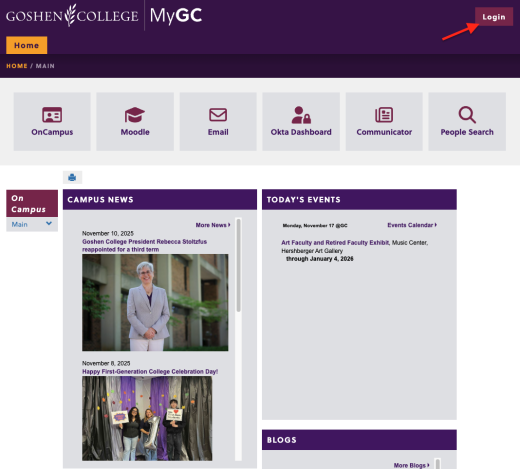
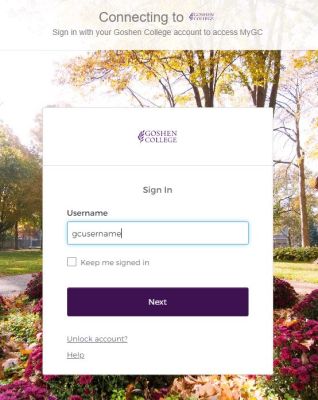
- Log in to mygc.goshen.edu with your Goshen College username and password. (Follow the on-screen instructions.)
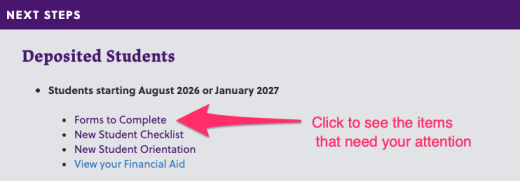
- When you’re logged in, the page you land on will include a section titled “Next Steps,” where you’ll see a link to “Forms to Complete.” Click that link.
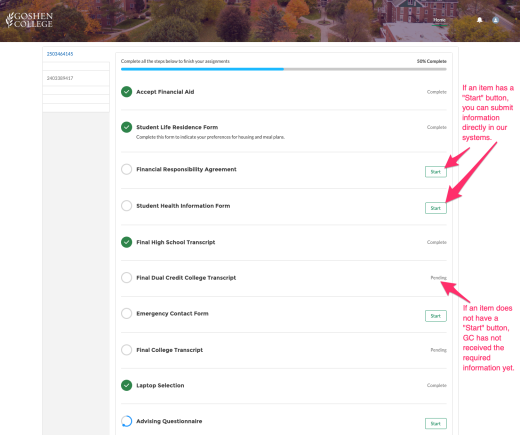
- A new browser tab will open and show you a list of your “Forms to Complete.” Any items without a green checkmark need your attention.
- For items with a “Start” button, click that button and follow the on-screen instructions.
- For items without a “Start” button, such as “Final High School Transcript” please make sure you have requested the necessary information – for example, from your graduating high school.
Step 1
Step 1
Step 2
Step 3
If you have difficulties accessing or completing the forms, contact your admissions counselor (or [email protected]) for assistance!